Enterprise Messaging
Integration Platform
for Hybrid Workplaces
SyncHub keeps teams on different chat platforms in one conversation, with messages synced both ways.
Request a demo
99.9%
Message Delivery Rate
24/7
Live Sync — Zero Downtime
Integration Status
Bridge your Slack, Microsoft Teams and Google Workspace conversations into one uninterrupted flow. No platform switching required.
Advanced Features for Cross-Platform Collaboration
Not just a connector. A complete Slack, Teams and Workspace integration software built for scale, security, and everyday use.
Multi-Directional Messaging
Real-time sync across platforms ensures messages, threads, and updates flow both ways, preserving context and improving productivity at every step.

Platform-Aware Transformation
SyncHub's AI layer intelligently reformats every message to match the native conventions of the receiving platform, so nothing looks out of place on either side.

Smart Identity Handling
Every message carries the correct sender identity through real-user attribution or smart bot labelling so there is never any confusion about who said what, from where.

Full Feature Support
DM sync, threads, replies, and link previews all flow seamlessly across platforms. No stripped context, no broken formatting, and no degraded experience on either side.

User Platform Flexibility
Nobody has to leave their preferred tool. Whether your team is on Slack or Teams, SyncHub ensures they stay productive without switching apps mid-conversation.

Enterprise-Grade Security
Every sync is protected through SSO and OAuth-based authentication, end-to-end message integrity checks, and full respect for platform-level permissions and access controls.
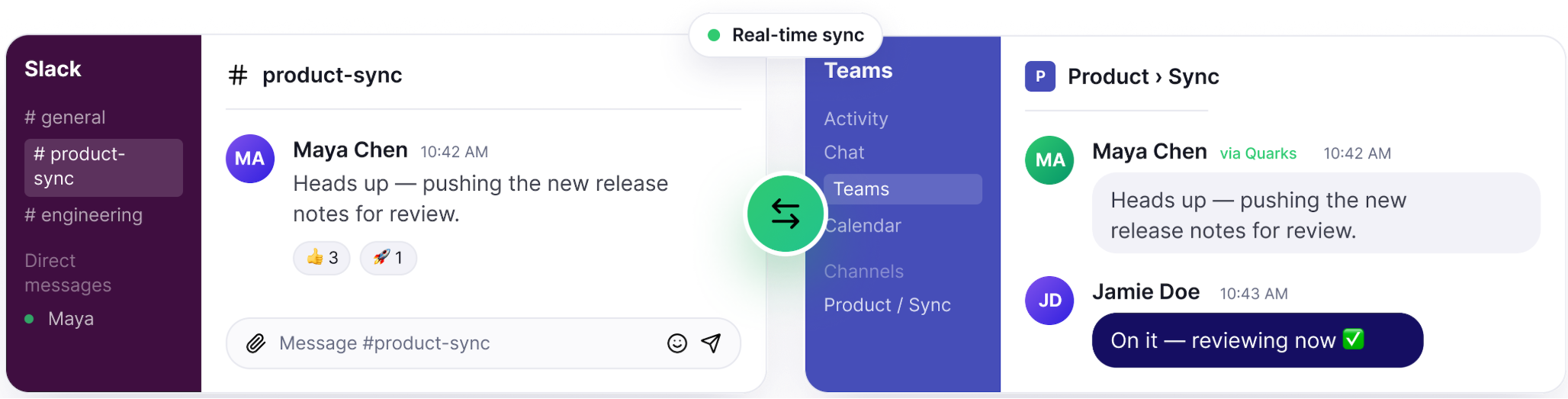
One Unified Communication Layer Across
Slack and Teams
SyncHub connects Slack and Microsoft Teams through a real-time, bi-directional sync engine, helping every team stay aligned on whichever platform they prefer, with no migrations, no missed messages, and no manual coordination.
Seamless Integration with Your Existing Systems
Connect SyncHub with your enterprise tools in minutes, not months.

Slack
Sync messages, threads, DMs, and replies directly within your existing Slack workspace with no disruption to current workflows.

Microsoft Teams
Connect Teams channels and conversations to Slack in real time, preserving identity, formatting, and full message context on both sides.

Google Workspace
Bridge Google Chat, Spaces, and Gmail threads into your unified communication flow so Google Workspace users stay in sync without switching platforms.

SSO and OAuth
Authenticate securely through your existing SSO and OAuth setup. No new passwords, no new accounts, and no changes to your identity infrastructure.
Built for Every Enterprise Use Case
Every organisation has its own communication complexity. SyncHub was built to handle all of it.

Cross-Team Collaboration
SyncHub keeps all sides connected with the same conversation, same context, and zero platform switching required from either side.

M&A and Multi-Region Teams
Mergers bring new tools and new people. SyncHub lets acquired teams stay on their existing platforms while staying fully connected with the broader organisation from day one.

Partner and Vendor Communication
Your vendors and partners will not switch platforms for you. With SyncHub, they do not have to. Conversations flow freely regardless of which tool either side prefers.

Hybrid Workforce Environments
Remote and in-office staff on different tools need not be on different planets. SyncHub makes enterprise Slack, Teams and Workspace integration feel completely effortless for distributed teams.
Explore Our Complete Engineering Ecosystem
Services that power what we build for you


Need Help Choosing the Right Integration Setup?
Our experts will help you integrate SyncHub with your existing Slack, Teams and Google Workspace environment.
Talk to Our ExpertsDrive Faster Communication and Better Decisions
Measurable business impact from day one.
Based on real-world enterprise deployment data from Quarks Technosoft.
30-40%
Faster Cross-Team Communication
25-35%
Productivity Improvement Across Teams
50%
Faster Decision-Making Enterprise-Wide
40-60%
Fewer Missed Messages Across Platforms 
Unify Your Communication Without Changing Tools
Break silos, improve collaboration, and enable seamless Slack, Microsoft Teams and Google Workspace integration across your entire organisation.
Frequently Asked Questions
What is Quarks SyncHub?
Quarks SyncHub is an enterprise messaging integration platform that connects Slack, Microsoft Teams, and Google Workspace. It synchronizes messages across platforms in both directions while preserving sender identity, conversation threads, replies, and message context.
Can SyncHub sync messages between Slack and Microsoft Teams in both directions?
Yes. SyncHub supports two-way message synchronization between Slack and Microsoft Teams, allowing users to send and receive messages across platforms while continuing to use their preferred communication tools.
Does SyncHub preserve message threads, replies, and sender identity across platforms?
SyncHub is designed to preserve conversation context across connected platforms, including threads, replies, and sender attribution. Its platform-aware formatting helps messages retain a native appearance in the receiving application.
Can SyncHub connect Slack, Microsoft Teams, and Google Chat without migrating users?
Yes. SyncHub connects existing communication environments so teams can continue using their preferred platforms. It helps organisations coordinate conversations across Slack, Microsoft Teams, and Google Workspace without requiring everyone to move to a single messaging tool.
How does SyncHub secure messages exchanged between different communication platforms?
SyncHub supports SSO and OAuth-based authentication, message integrity checks, and existing platform permissions and access controls. These capabilities help enterprises connect communication systems while maintaining their established identity and security controls.
Can SyncHub help companies connect communication platforms after a merger or acquisition?
Yes. SyncHub can connect teams that continue using different messaging platforms after a merger or acquisition. It allows employees to communicate across existing environments while organisations work through their longer-term collaboration and technology integration plans.
Can SyncHub connect external partners and vendors who use different messaging platforms?
SyncHub is designed to bridge communication across different platform environments, helping organisations coordinate with partners and vendors who use different tools. The available integrations and access configuration should be confirmed for the specific external collaboration setup.
 contact@qtsolv.com